Read first, study second
Extensive reading is the engine. Flashcards are the safety net — there when you need them, silent when you don't.
Uninterrupted flow, smart definitions, personalized to you.
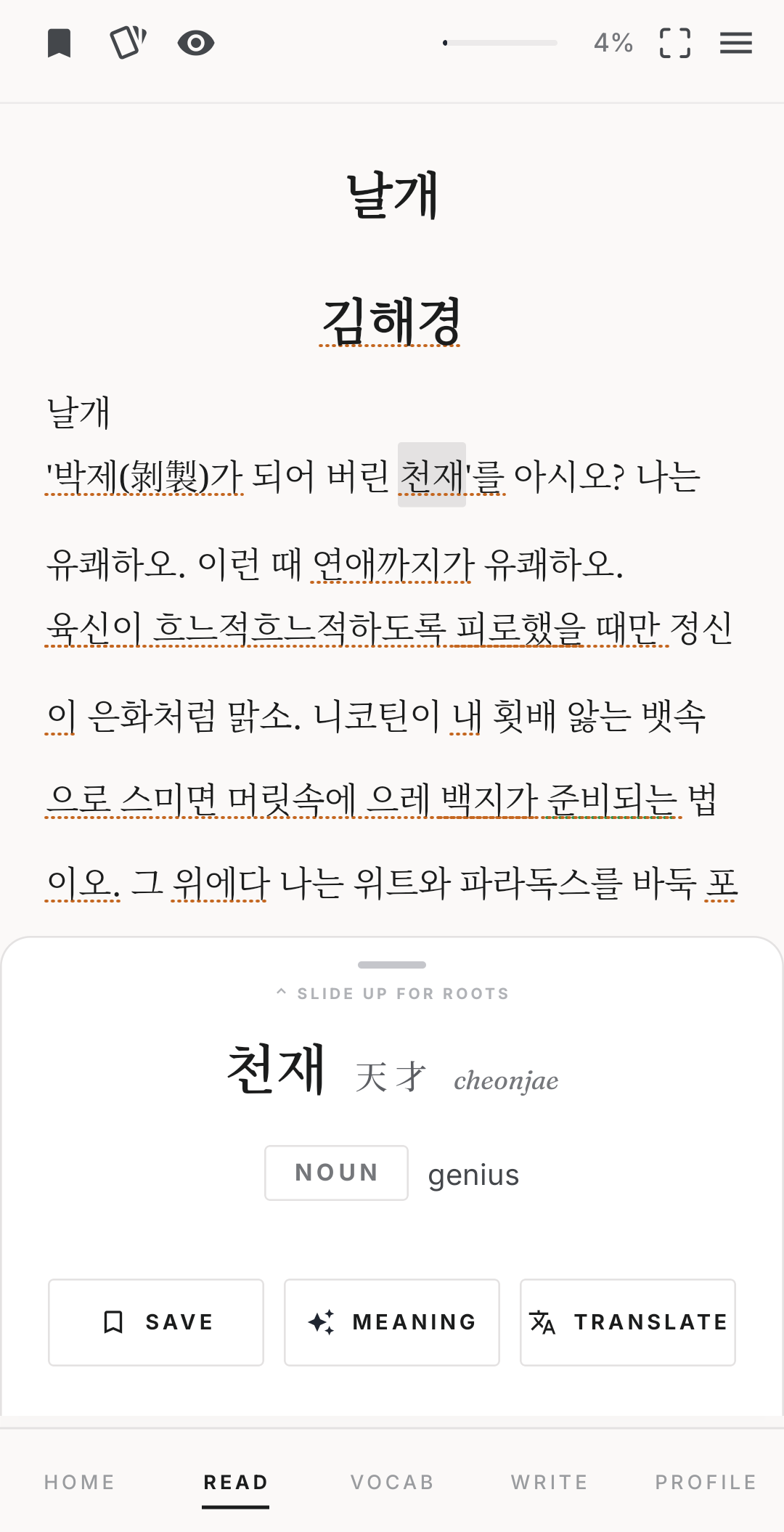
Grow your vocabulary by actually reading. Tap any word for an instant definition, or a smart in-context explanation when the meaning bends. Focus mode keeps you in the flow, an OCR overlay brings the same help to anything outside the app, and personalized recommendations line up your next book. Flashcards wait quietly in the background, for the words that try to slip away.
On Android now via GitHub · Google Play coming soon · all releases
No streaks. No confetti. Just reading.
Features
Everything here serves one idea: the more you read, the more Korean you know. The tools stay out of the way.
Extensive reading is the engine. Flashcards are the safety net — there when you need them, silent when you don't.
Instant offline definitions and romanization — plus the hanja roots behind a word, and related words you already know that share them. AI explains tricky uses in context.
Public-domain Korean classics are built in — 감자, 날개, 운수 좋은 날. Import any EPUB or PDF, and Noeul estimates how much of it you'll understand before you start.
Every card shows the sentence you met the word in — and related hanja words you've marked as known. Spaced repetition (FSRS) schedules the rest.
A floating OCR button reads Korean text in any app — webtoons, subtitles, screenshots — and makes every word tappable, just like in the reader.
Turn the words you're learning around: write in Korean and an AI assessment marks what to fix and what already works, line by line.
How it works
Start with a built-in classic or import your own. Each book shows how much of it you'll understand — pick something a little easy. That's the point.
Hit an unknown word? Tap it. Definition, romanization, root characters — then back to the story.
The words you met wait in a quiet deck. Review surfaces them right before you'd forget — no sooner.
Under the hood
No placement tests, no grades. Noeul keeps a quiet, on-device estimate of which words you know — and every part of the app draws on it.
Pick your vocabulary size from word banks — rows of the most common Korean words (the top 100, 300, 700…). Tap the last row you fully know. That single tap seeds your level.
Every word carries a difficulty grade, and every lookup, save, and flashcard review nudges your level estimate up or down. Together they give the odds you know any given word — before you ever tap it.
Import an EPUB or PDF and Noeul scans its vocabulary against your level: an estimate of how much you'll understand, shown before chapter one — and it keeps sharpening as you read.
A word is only suggested when Noeul is genuinely unsure you know it and it's too rare in the book for the story to teach it by repetition. Frequent words are left to reading — and new flashcards start on a schedule matched to how well you probably know them.
Try it
This is the real reading screen. Tap a word, ask what it means here, step through in focus mode — go ahead, it's live.
Tip: tap any underlined word.
Instant definition, part of speech, romanization — and the hanja behind it.
The hanja behind the word — and related words that share them, including ones you already know.
A short AI explanation of the word's sense in this sentence — figurative uses and all.
Hold any line for a whole-sentence translation, not just a single word.
Everything fades except the sentence you're on — held in the lower half of the screen, so stepping, looking up, and saving words all stay within your thumb's reach. Swipe or tap the arrows to move.
Tap the card icon — everything you've saved in this book, plus a daily short list of words worth saving, picked for you.
FAQ
Yes — Noeul is completely free.
If you know hangul and a handful of words, you can begin. When you start, you pick your vocabulary size from word banks — rows of the most common Korean words — and Noeul calibrates from there, refining its picture of your level as you read.
Partly. Definition lookups — including hanja and root characters — work offline, and focus mode works too. AI in-context explanations and sentence translation need an internet connection, so those parts pause when you're offline.
Korean is the focus today. English and Chinese learning are on the roadmap, and we're open to more — if there's a language you think fits this read-first format, reach out and tell us.
Yes. Noeul reads EPUB and PDF files, so you can bring your own books alongside the built-in public-domain classics you can read right away.